Topograph & µGraph
Drum sequencer
Contents
Description
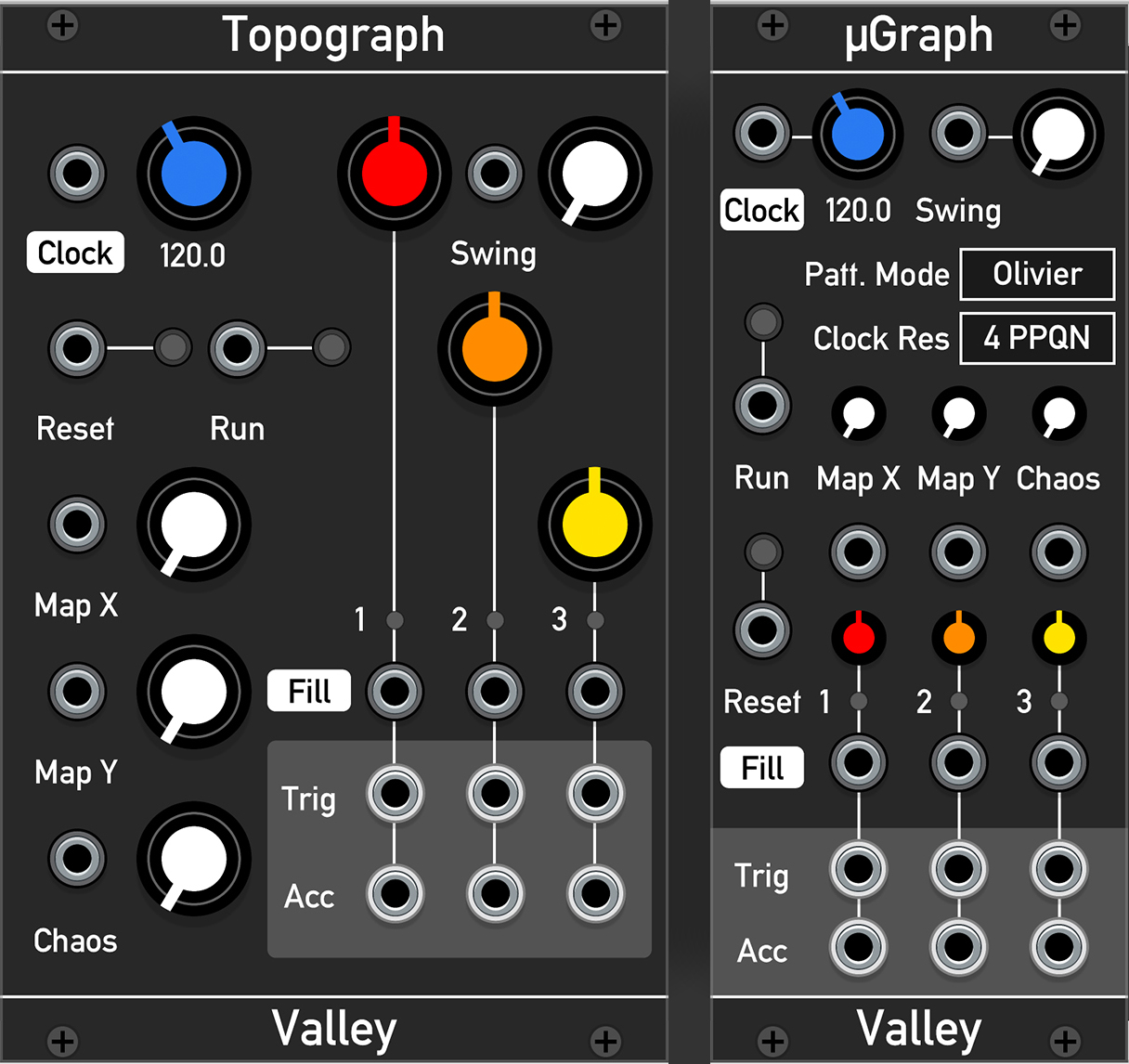
Topograph & µGraph are 3 channel drum sequencer modules that emulate the Mutable Instruments' "Grids". Rather than relying on the user to manually enter patterns, the modules each have a vast, built-in map of drum patterns that can be seamlessy explored using high level controls, making this a 'topographic' sequencer (hence the name). The sequences include various styles of pattern 'skeletons' from around the world, and the density of each part can be set from sparse and simple through to dense and frantic. Before continuing, as these modules have the same features as Grids, it is worth reading its manual over here
Usage
Controls
- Tempo: The blue knob controls the tempo or speed of the sequencer. Fully left enables external clocking
- Map X/Y: Sets the pattern skeleton. These controls are continuously variable, which means the patterns can be smoothly morphed between
- Chaos: Determines how often the density of each pattern channel will vary after each bar.
- Density: These three knobs control how dense each channel will be. Fully left effectively mutes the channel, whilst fully right causes the channel's pattern to be very dense and regular
- Swing: Controls the swing or groove of the sequence. This is not normally available in Grids whete normally the Chaos knob is sacrificed. This also allows for swing in Euclidean mode
Context Menu
This list is mostly relevant to Topograph as most of these options have dedicated control widgets in µGraph
-
Panel Style: Changes the colour of the front panel. Useful for when patching in poor lighting conditions
- Dark
- Light
-
Sequencer Mode: Determines how the built-in drum patterns will be played
- Henri: The "Max 4 Live" clone mode
- Original: The original mode
- Euclidean: Turns the module into a basic Euclidean sequencer
-
Trigger Output Mode: Sets the length of the output pulse
- 1ms Pulse
- Gate
-
Accent Output Mode: Dictates the behaviour of the 3 accent outputs
- Inidividual Accents, where each is a dedicated accent for each instrument output
- Accent / Clock / Reset, where all accents are summed to a single output whilst there is now a dedicated clock and reset output. Useful for chaining and remote controlling sequencers
-
Ext. Clock Resolution Sets the internal step counter to a multiple of the external clock's resolution (i.e. Pulse Per Quarter Note, PPQN). For best syncronisation, match this setting to the external clock's resolution
- 4 PPQN
- 8 PPQN
- 24 PPQN
-
Run Mode Determines whether the sequencer's "Run" behaviour
- Toggle: The sequencer will either start or stop each time "Run" is triggered
- Momentary: The sequencer will only run if "Run" is high / on. Else, it will not run when "Run" is low / off
Sequencing Modes
Topograph & µGraph feature 3 sequencing modes: Henri, Original, and Euclidean. Henri and Original use the preset pattern map built into the sequencer's memory. Whilst they read the same data, the difference is in how they read it, thus resulting in two 'flavours' of the same sequence data. In Euclidean mode, however, each output generates patterns based on the principles of Euclidean geometry. The sequencer generates a series of roughly evenly spaced pulses from each channel regardless of the density. Like Henri and Original, the higher the density, the more pulses.
FAQ / Gotchas
- "How do I make Topograph / µGraph synchronise to a clock source?"
- Make sure that a clock signal is plugged into the Clock jack, turn the blue tempo knob fully left until the BPM text reads "Ext", and then press Run
- "The sequencer is too slow when I use an external clock source!"
- You need to make sure that the clock resolution / multiplier / PPQN matches the sequencer's resolution set in the conext menu under (Topograph) or "Clock Res" box (µGraph)
- "Topograph / µGraph is not resetting its pattern in sync with other sequencers!"
- This is due to how the reset behaviour was implemented. Unlike the real module "Grids", when Reset is triggered in Topograph / µGraph it will restart the pattern on the NEXT clock cycle, rather than immediately (thank you mylarmelodies for pointing this out). A future update will provide an option to toggle between the current beahviour and the (more correct) Grids behaviour. More information on how to deal with sync issues in Rack and modular in general can be viewed here